buuoltwo的博客
buuoltwo的博客

¶ Vue3基本实践-通信/指令/ref&reactive/setup
¶ VUE3子组件调用父组件的方法
¶ v-bind (指令简写为:)
父组件
<navBar :onClickRight="onClickRight"></navBar> setup() { let onClickRight = () => { console.log("你好"); }; return { onClickRight, }; },复制成功
1
2
3
4
5
6
7
8
9
10
11
2
3
4
5
6
7
8
9
10
11
子组件
<van-nav-bar @click-right="onClickRight" /> props: { onClickRight: { type: Function, default: () => { return Function; }, }, }, setup(props, { emit, attrs, slots }) { let { onClickRight } = toRefs(props); // 让props下的count保持活性 }, };复制成功
1
2
3
4
5
6
7
8
9
10
11
12
13
14
15
16
2
3
4
5
6
7
8
9
10
11
12
13
14
15
16
¶ v-on (指令简写为@)
父组件
<template> <MapFeatures @getGeolocation="getGeolocation" /> </template> <script> setup() { const getGeolocation = () => { console.log('call..') } return { getGeolocation, } } </script>复制成功
1
2
3
4
5
6
7
8
9
10
11
12
13
14
15
16
2
3
4
5
6
7
8
9
10
11
12
13
14
15
16
子组件写法1
<template> <div> <!-- Geolocation --> <div @click="$emit('getGeolocation')" > <p>4399</p> </div> </div> </template> <script> export default { name: "MapfeaturesVue", props: [], } </script>复制成功
1
2
3
4
5
6
7
8
9
10
11
12
13
14
15
16
17
2
3
4
5
6
7
8
9
10
11
12
13
14
15
16
17
子组件写法2
<template> <div> <!-- Geolocation --> <div @click="getGeolocation" > <p>4399</p> </div> </div> </template> <script> export default { name: "MapfeaturesVue", props: [], setup(props, { emit }) { const getGeolocation = (result) => { emit("plotResult", result.geometry) } return { getGeolocation } } } </script>复制成功
1
2
3
4
5
6
7
8
9
10
11
12
13
14
15
16
17
18
19
20
21
22
23
24
2
3
4
5
6
7
8
9
10
11
12
13
14
15
16
17
18
19
20
21
22
23
24
¶ v-on 与编译器宏
只需要在子组件改动
<template> <div> <!-- Geolocation --> <div @click="emitMMM('getGeolocation')" <p>4399</p> > </div> </template> <script setup> defineProps({ geoErrorMsg: Boolean, }) const emitMMMMM = defineEmits(["closeGeoError"]) </script>复制成功
1
2
3
4
5
6
7
8
9
10
11
12
13
14
15
16
2
3
4
5
6
7
8
9
10
11
12
13
14
15
16
¶ vue3父组件调用子组件中的方法
父组件 ParentComponents.vue
<!-- 1. 在子组件上绑定ref --> <children-component ref="getChildList"></children-component> ... <script> import { ref } from 'vue' export default { setup () { // 2、父组件中定义和ref同名的变量 const getChildList = ref(null) onMounted (() => { // 4、调用子组件中的getList()方法 console.log(getChildList.value.getList()) }) return { // 3、return出去 getChildList } } }) </script>复制成功
1
2
3
4
5
6
7
8
9
10
11
12
13
14
15
16
17
18
19
20
21
2
3
4
5
6
7
8
9
10
11
12
13
14
15
16
17
18
19
20
21
子组件
export default { setup () { // 方法 const getList = () => { console.log('子组件中的方法') } return { getList } } }复制成功
1
2
3
4
5
6
7
8
9
10
11
2
3
4
5
6
7
8
9
10
11
¶ 循环表示list-item
数据结构:
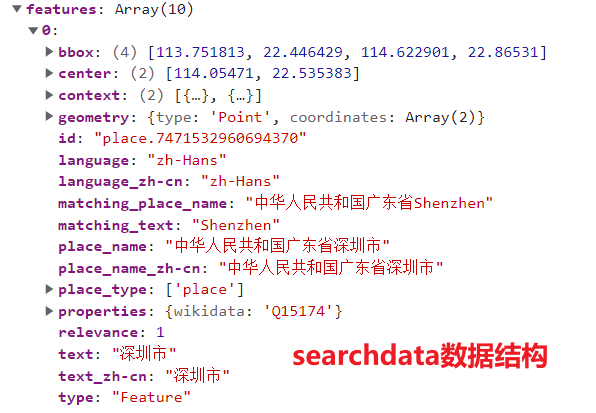
v-for指令:
<template> <div class="h-[200px] overflow-scroll bg-white rounded-md"> <div class="px-4 py-2 flex gap-x-2 cursor-pointer hover:bg-slate-600 hover:text-white" v-for="(result, index) in searchData" :key="index" > <i class="fas fa-map-marker-alt"></i> <p class="text-[12px]">{{ result.place_name }}</p> </div> </div> </template>复制成功
1
2
3
4
5
6
7
8
9
10
11
12
2
3
4
5
6
7
8
9
10
11
12
效果:

¶ v-if指令
v-if -> Loading
v-else-if -> Boundary
v-else -> Target
¶ vue3中定义变量,ref、reactive、toRefs特性详解
¶ 1.ref() 函数
用来定义响应式变量。
ref() 函数用来根据给定的值创建一个响应式的数据对象,传入的为基本数据类型,例如字符串、数字、boolean 等,返回值是一个对象,这个对象上只包含一个 value 属性
ref定义的变量,改变值要.value,而且在template中不用写.value
<template> <div>{{msg}}</div> <button @click="changeMsg()">修改msg</button> </template> <script> import {reactive,ref,toRefs} from 'vue' export default { setup() { //定义 const msg = ref('你好') //修改 const changeMsg =()=>{ msg.value ='msg被改了' } //导出 return { msg, changeMsg } } } </script>复制成功
1
2
3
4
5
6
7
8
9
10
11
12
13
14
15
16
17
18
19
20
21
22
23
24
2
3
4
5
6
7
8
9
10
11
12
13
14
15
16
17
18
19
20
21
22
23
24
¶ 2、reactive() 函数
reactive函数传入的为引用类型,例如数组、对象等,但不能代理基本类型值,返回一个响应式的数据对象, 想要使用创建的响应式数据也很简单,创建出来之后,在setup中return出去,直接在template中调用即可。
<template> <div>{{state.msg}}</div> <button @click="changeMsg()">修改msg</button> </template> <script> import { reactive, ref, toRefs } from 'vue' export default { setup() { //定义 const state = reactive({ msg: '你好', msg2:'hello' }) //修改 const changeMsg = () => { state.msg = 'msg被改了' } //导出 return { state, changeMsg } } } </script>复制成功
1
2
3
4
5
6
7
8
9
10
11
12
13
14
15
16
17
18
19
20
21
22
23
24
25
2
3
4
5
6
7
8
9
10
11
12
13
14
15
16
17
18
19
20
21
22
23
24
25
¶ 3、toRefs() 函数
toRefs() 函数可以将 reactive() 创建出来的响应式对象,转换为普通的对象,相当于变成一个个的ref(),类似使用拓展用算符…的方法返回数据data 使用toRefs和reactive()区别在于可以直接使用msg属性,不用state.
<template> <div>{{msg}}</div> <button @click="changeMsg()">修改msg</button> </template> <script> import { reactive, ref, toRefs } from 'vue' export default { setup() { //定义 const state = reactive({ msg: '你好', msg2:'hello' }) //修改 const changeMsg = () => { state.msg = 'msg被改了' } //导出 return { ...toRefs(state), changeMsg } } } </script>复制成功
1
2
3
4
5
6
7
8
9
10
11
12
13
14
15
16
17
18
19
20
21
22
23
24
25
2
3
4
5
6
7
8
9
10
11
12
13
14
15
16
17
18
19
20
21
22
23
24
25
晓露寝安浅云逍遥十漾轻拟