buuoltwo的博客
buuoltwo的博客
¶ React-Hooks逻辑复用-多种实现比较
KEY: To reuse stateful logic in react, sharing non-visual logic, 创建与任何UI分离的自定义Hook
复制粘贴是最粗暴的复用行为,其他两种比较不行的复用为:
- 使用高阶组件
- 使用
Render Prop
以下的例子是悬停添加Tooltip的实现:
- 在HOC和Render Prop的例子中,两个事件已经被复用。
- 但是他们的缺陷在于,开发者将被迫修改DOM结构。
- React逻辑复用较佳实践:Tradeoffs概念
¶ 复制粘贴
复制粘贴代码实现
// Copy/Pasting //Info.js function Info({ id, size }) { const [hovering, setHovering] = React.useState(false) const mouseOver = () => setHovering(true) const mouseOut = () => setHovering(false) return (<div> <> {hovering === true ? <Tooltip id={id}></Tooltip> : null} <svg onMouseOver={mouseOver} onMouseOut={mouseOut} width={size} ><path></path></svg> </> </div>) } //TrendChart.js function TrendChart({ id, size }) { const [hovering, setHovering] = React.useState(false) const mouseOver = () => setHovering(true) const mouseOut = () => setHovering(false) return (<div> <> {hovering === true ? <Tooltip id={id}></Tooltip> : null} <div className="balabala..." onMouseOver={mouseOver} onMouseOut={mouseOut} width={size}></div> </> </div>) } //DailyChart.js function DailyChart({ id, size }) { const [hovering, setHovering] = React.useState(false) const mouseOver = () => setHovering(true) const mouseOut = () => setHovering(false) return (<div> <> {hovering === true ? <Tooltip id={id}></Tooltip> : null} <div className="cilacila..." onMouseOver={mouseOver} onMouseOut={mouseOut} width={size}></div> </> </div>) }复制成功
1
2
3
4
5
6
7
8
9
10
11
12
13
14
15
16
17
18
19
20
21
22
23
24
25
26
27
28
29
30
31
32
33
34
35
36
37
38
39
40
41
42
43
44
45
46
47
48
49
50
51
52
53
54
55
56
57
58
2
3
4
5
6
7
8
9
10
11
12
13
14
15
16
17
18
19
20
21
22
23
24
25
26
27
28
29
30
31
32
33
34
35
36
37
38
39
40
41
42
43
44
45
46
47
48
49
50
51
52
53
54
55
56
57
58
¶ 使用高阶组件
使用HOC,接受arguments。
// HOC function WithHover(Component) { return function (props) { const [hovering, setHovering] = React.useState(false) const mouseOver = () => setHovering(true) const mouseOut = () => setHovering(false) return ( <div onMouseOver={mouseOver} onMouseOut={mouseOut}> {hovering === true ? <Tooltip id={id}></Tooltip> : null} <Component {...props} hovering={hovering}></Component> </div> ) } } //调用 const InfoWithHover = withHover(Info) const TrendChartWithHover = withHover(TrendChart) const DailyChartWithHover = withHover(DailyChart) function Info(hovering) { return (<> {hovering === true ? <Tooltip id={id}></Tooltip> : null} <svg></svg> </>) } function TrendChart(hovering) { return (<> {hovering === true ? <Tooltip id={id}></Tooltip> : null} <div className="balabala..."></div> </>) } function DailyChart(hovering) { return (<> {hovering === true ? <Tooltip id={id}></Tooltip> : null} <div className="cilacila..."></div> </>) }复制成功
1
2
3
4
5
6
7
8
9
10
11
12
13
14
15
16
17
18
19
20
21
22
23
24
25
26
27
28
29
30
31
32
33
34
35
36
37
38
39
40
41
42
43
44
2
3
4
5
6
7
8
9
10
11
12
13
14
15
16
17
18
19
20
21
22
23
24
25
26
27
28
29
30
31
32
33
34
35
36
37
38
39
40
41
42
43
44
¶ 使用Render Props
使用公共组件,并向公共组件传递render方法。
// Render Props function Hover({ render }) { const [hovering, setHovering] = React.useState(false) const mouseOver = () => setHovering(true) const mouseOut = () => setHovering(false) return ( <div onMouseOver={mouseOver} onMouseOut={mouseOut}> {render(hovering)} </div> ) } //需传递render方法 const InfoWithHover = <Hover render={(hovering) => <Info hovering={hovering} />}></Hover> const TrendChartWithHover = <Hover render={(hovering) => <TrendChart hovering={hovering} />}></Hover> const DailyChartWithHover = <Hover render={(hovering) => <DailyChart hovering={hovering} />}></Hover> function Info(hovering) { return (<> {hovering === true ? <Tooltip id={id}></Tooltip> : null} <svg></svg> </>) } function TrendChart(hovering) { return (<> {hovering === true ? <Tooltip id={id}></Tooltip> : null} <div className="balabala..."></div> </>) } function DailyChart(hovering) { return (<> {hovering === true ? <Tooltip id={id}></Tooltip> : null} <div className="cilacila..."></div> </>) }复制成功
1
2
3
4
5
6
7
8
9
10
11
12
13
14
15
16
17
18
19
20
21
22
23
24
25
26
27
28
29
30
31
32
33
34
35
36
37
38
39
40
2
3
4
5
6
7
8
9
10
11
12
13
14
15
16
17
18
19
20
21
22
23
24
25
26
27
28
29
30
31
32
33
34
35
36
37
38
39
40
¶ 自定义Hook
它不与任何UI耦合,可以返回任何它想要的东西。
- DOM树结构不再需要添加 不必要的包装组件
我们希望
useHover的消费者有两条数据,the hovering state& 要添加悬停状态的DOM节点的属性。
// Custom Hook const useHover = (initialValue) => { const [hovering, setHovering] = useHover(!!initialValue) const mouseOver = () => setHovering(true) const mouseOut = () => setHovering(false) const attrs = { onMouseOver: mouseOver, onMouseOut: mouseOut } return [hovering, attrs] } // UI function Info() { const [hovering, attrs] = useHover(false) return ( <> {hovering ? <Tooltip /> : null} < svg {...attrs} /> </> ) } function TrendChart() { const [hovering, attrs] = useHover(false) return ( <> {hovering ? <Tooltip /> : null} <div className="balabala..." {...attrs}></div> </> ) } function DailyChart() { const [hovering, attrs] = useHover(false) return ( <> {hovering ? <Tooltip /> : null} <div className="cilacila..." {...attrs}></div> </> ) }复制成功
1
2
3
4
5
6
7
8
9
10
11
12
13
14
15
16
17
18
19
20
21
22
23
24
25
26
27
28
29
30
31
32
33
34
35
36
37
38
39
40
2
3
4
5
6
7
8
9
10
11
12
13
14
15
16
17
18
19
20
21
22
23
24
25
26
27
28
29
30
31
32
33
34
35
36
37
38
39
40
¶ 比较小结 &一些简单hook
¶ 比较小结
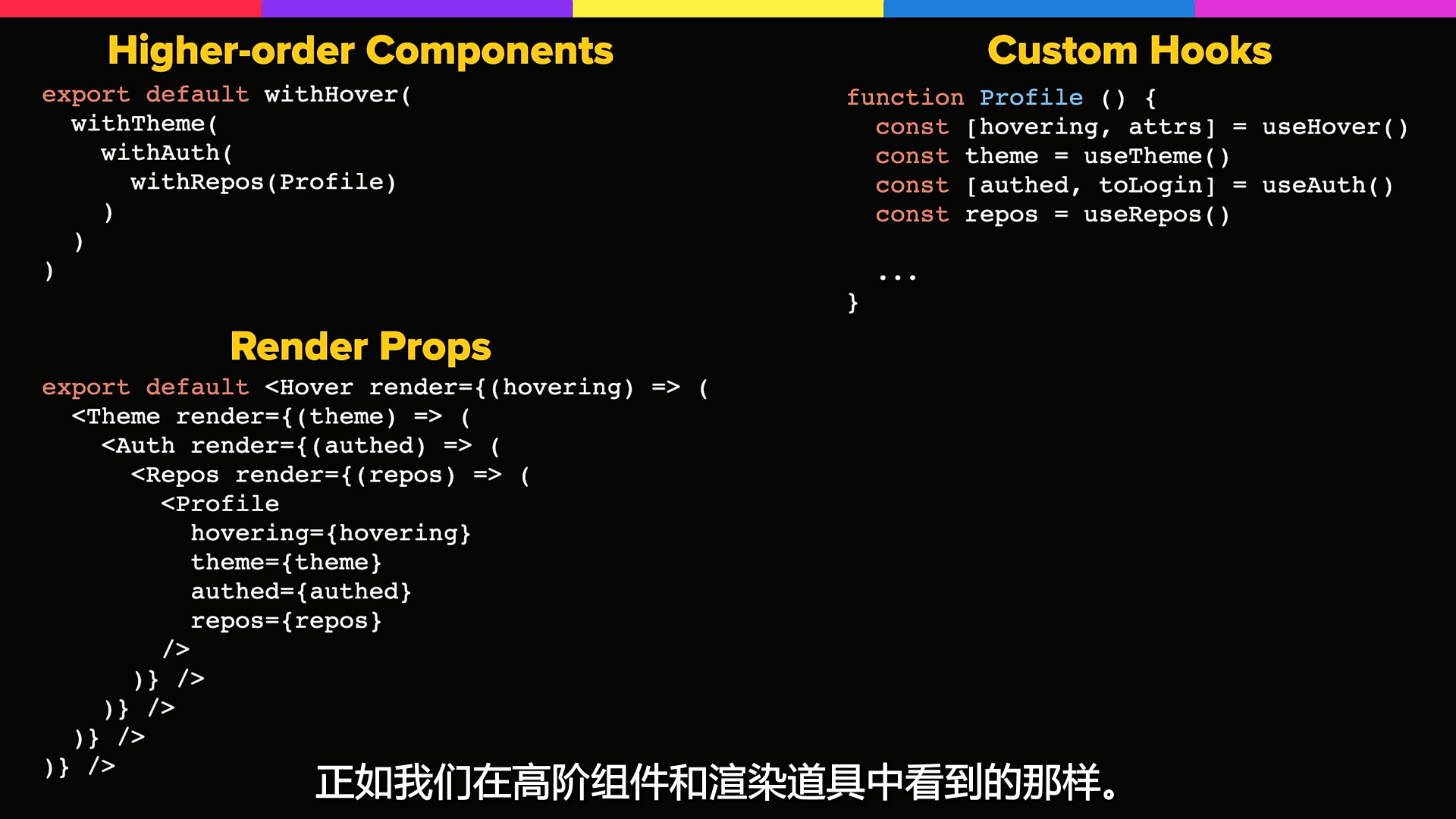
依图比较可见,开发者使用更多的自定义Hook,能够很好简化DOM树结构:
¶ 简单hook:
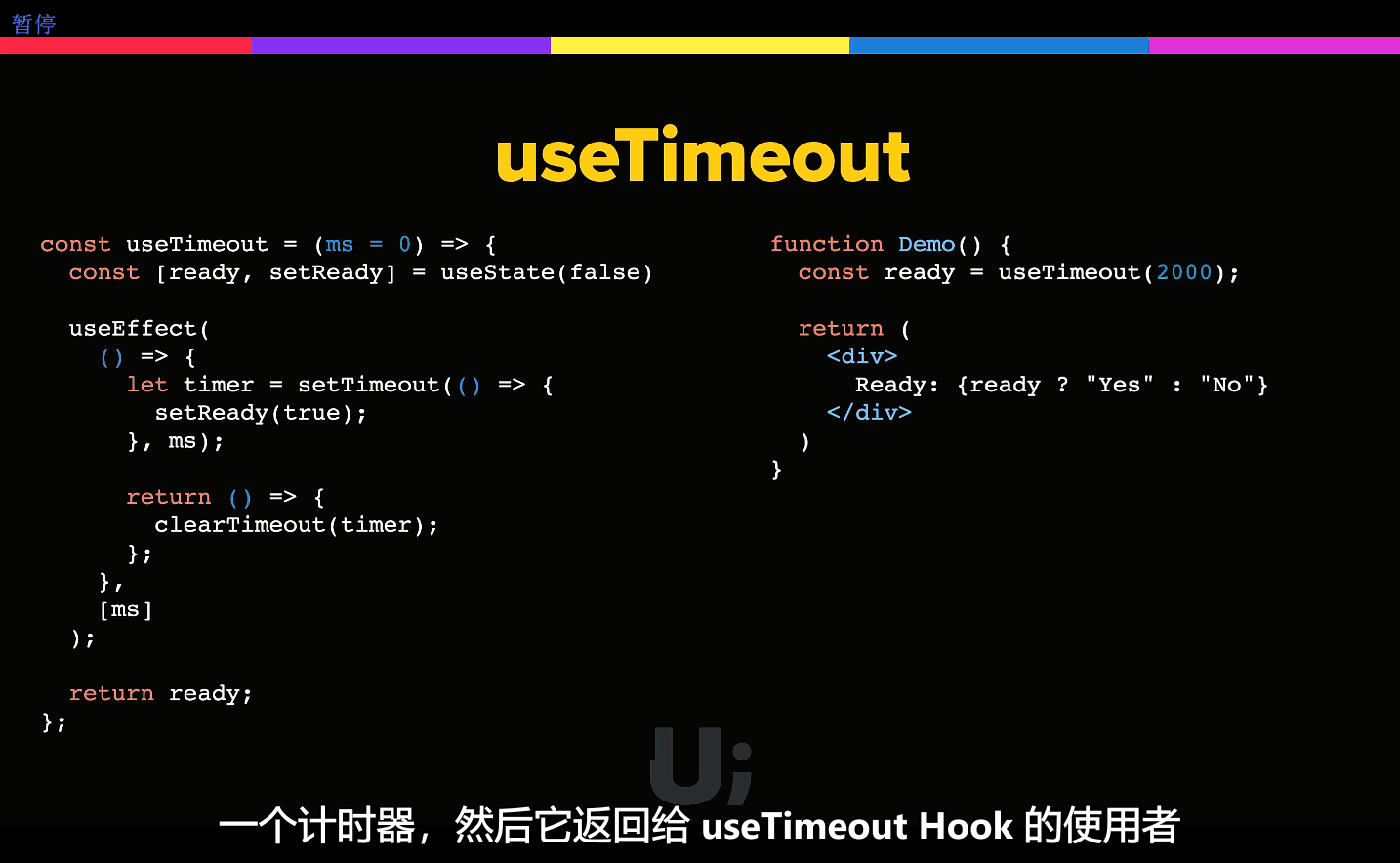
¶ useTimeout
IF your timer is ready ? say yes or no.
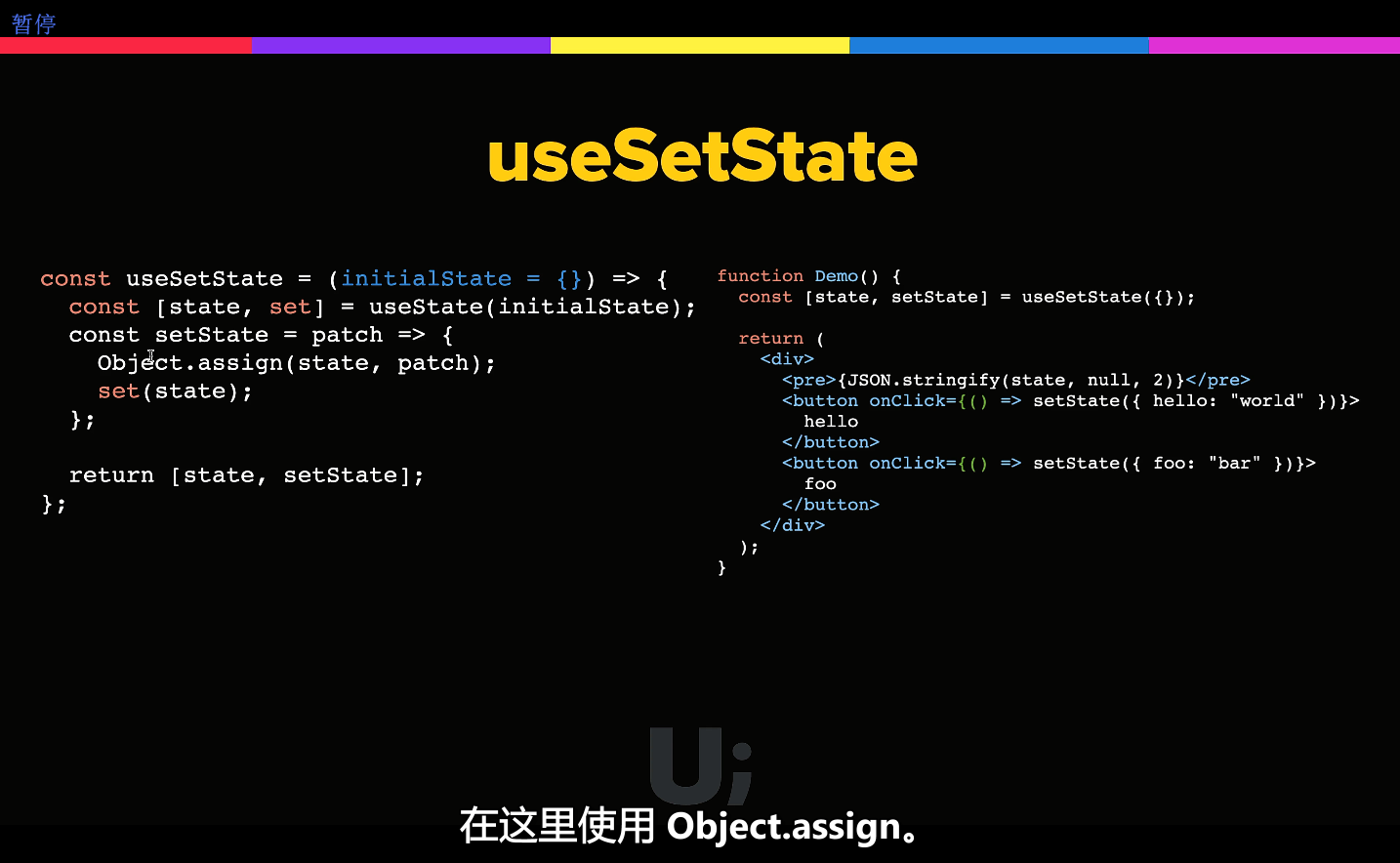
¶ useSetState
实现古老的setState。
¶ useStateCallback
(想起了古老的setState是有一个callback的,stackoverflow是这样解决的:
reactjs - How to use
setStatecallback on react hooks - Stack Overflowreactjs - How to use callback with useState hook in react - Stack Overflow
Usage
const App = () => { const [state, setState] = useStateCallback(0); // same API as useState const handleClick = () => { setState( prev => prev + 1, // second argument is callback, `s` being the *updated* state s => console.log("I am called after setState, state:", s) ); }; return <button onClick={handleClick}>Increment</button>; }复制成功
1
2
3
4
5
6
7
8
9
10
11
12
13
2
3
4
5
6
7
8
9
10
11
12
13
useStateCallback
function useStateCallback(initialState) { const [state, setState] = useState(initialState); const cbRef = useRef(null); // init mutable ref container for callbacks const setStateCallback = useCallback((state, cb) => { cbRef.current = cb; // store current, passed callback in ref setState(state); }, []); // keep object reference stable, exactly like `useState` useEffect(() => { // cb.current is `null` on initial render, // so we only invoke callback on state *updates* if (cbRef.current) { cbRef.current(state); cbRef.current = null; // reset callback after execution } }, [state]); return [state, setStateCallback]; }复制成功
1
2
3
4
5
6
7
8
9
10
11
12
13
14
15
16
17
18
19
20
2
3
4
5
6
7
8
9
10
11
12
13
14
15
16
17
18
19
20
Further info: React Hooks FAQ: Is there something like instance variables?
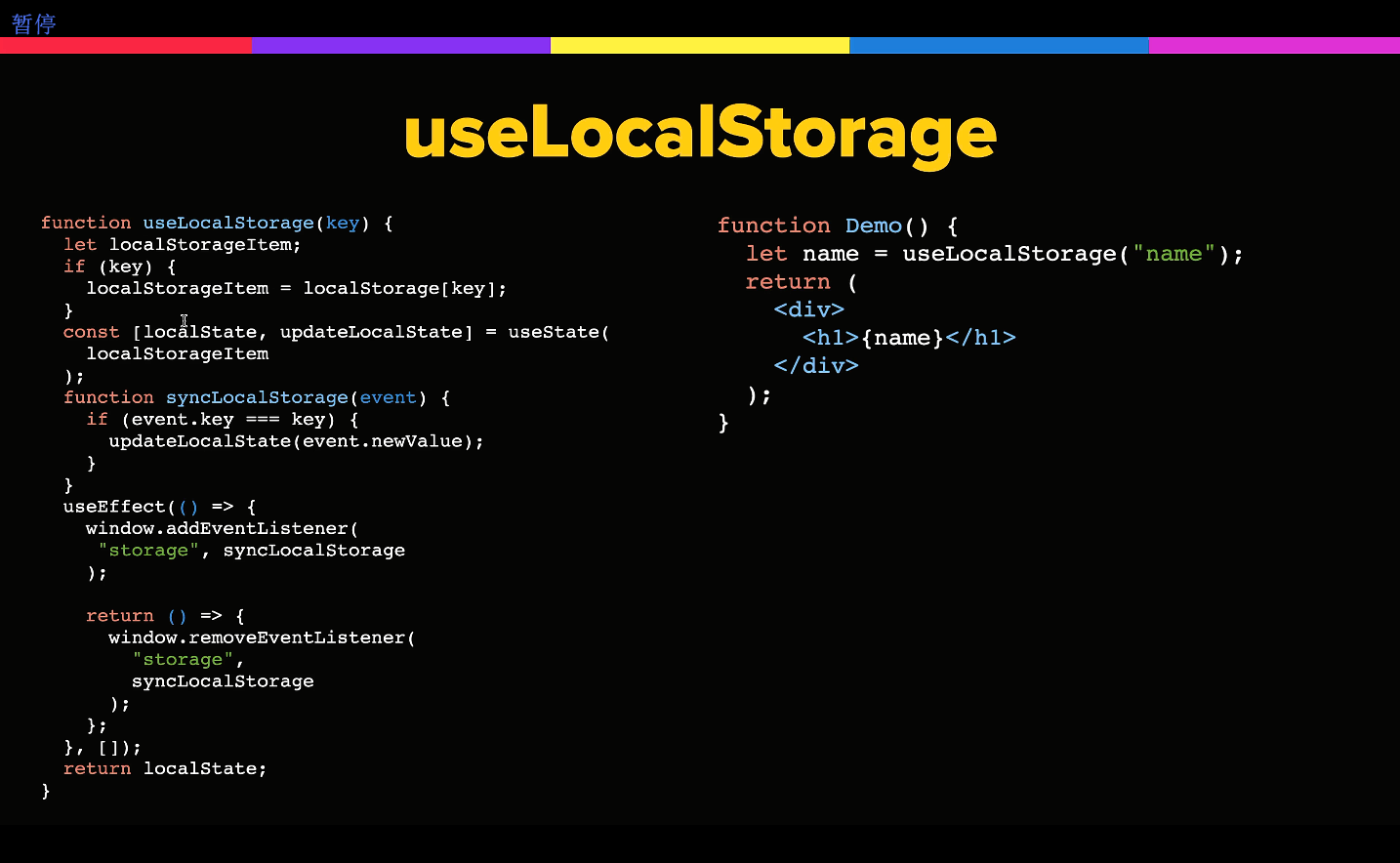
¶ useLocalStorage
¶ 最后。

晓露寝安浅云逍遥十漾轻拟